This is a weird issue I encountered where even though I had tried restarting explore.exe and disabled and enabled desktop icons, they still weren’t showing. Even weirder was the fact that only some of them were showing whilst others weren’t. Weird indeed.
Here you can see that the text file “Test” isn’t showing on my desktop even though it is in the desktop folder:

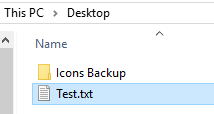
To remedy this issue, what I had to do was right click on the desktop, go into “Sort By” and select “Name“. This jiggled the desktop and made the text file appear. Not sure what causes this at all.
Hopefully someone finds this useful, I know I could have done with this information at the time. Enjoy!